Thanks guys, I was able to get this working and send an SMS with AT commands on my A6 module! I’m embarrassed to say that the big problem was that I had been putting the SIM card in backwards. It never occurred to me that the square end should go in first and the notched end would be sticking out of the slot. I had assumed it was keyed so that it would only fit one way with the notched end touching something on the inside of the slot. I only noticed because there were scratches outside of the contact area on the SIM card from the wrong areas touching the contacts. This is how it is supposed to fit:
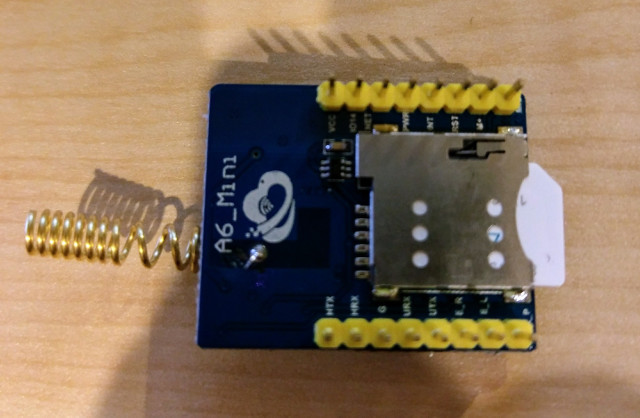
If anyone is interested, this is the code that I used in my Arduino Nano using SoftwareSerial to send an SMS message after powering up. About 30 seconds after starting, you should get a text message:
#include <SoftwareSerial.h>

int RX_PIN = 10;
int TX_PIN = 11;
int RESET_PIN = 7;

SoftwareSerial mySerial(RX_PIN, TX_PIN); // RX, TX
long baud = 9600;

void setup() {
  Serial.begin(baud);
  mySerial.begin(baud);
  initModem();

  sendSmsMessage("15556667777","This is a test!");
}

void loop() {
}

void initModem() {
  // Reset modem
  delay(100);
  pinMode(RESET_PIN, OUTPUT);
  digitalWrite(RESET_PIN, HIGH);
  delay(2000);
  digitalWrite(RESET_PIN, LOW);
  delay(5000);

  int modemFound = doAutoBaud();

  if (modemFound > 0) {
    delay(500);
    Serial.println("AT");
    delay(200);

    sendCmd("AT");
    sendCmd("ATE0");
    sendCmd("AT+CMGF=1");
    sendCmd("AT+CGDCONT=1,\"IP\",\"hologram\"");
    sendCmd("AT+CSTT=\"hologram\",\"\",\"\"");

    delay(2000);
  }

}

int doAutoBaud() {
  int toReturn = 0;
  for (int i=0; i < 10; i++) {
    if (toReturn == 0) {
      mySerial.println("AT");
      delay(500);
      if (mySerial.available()) {
        String responseStr = mySerial.readString();
        if (responseStr.substring(6,8) == "OK") {
          toReturn = 1;
        }
      }
    }
  }
  return toReturn;
}

void sendCmd(String cmd) {
  Serial.println(cmd);
  mySerial.println(cmd);
  int response = 0;
  while (response < 1) {
    if (mySerial.available()) {
      Serial.println(mySerial.readString());
      response = 1;
    }
    delay(100);
  }
}

void sendSmsMessage(String phoneNumber, String message) {
  mySerial.print("AT+CMGS=\"");
  mySerial.print(phoneNumber);
  mySerial.write(0x22);
  mySerial.write(0x0D);
  mySerial.write(0x0A);
  delay(2000);
  mySerial.print(message);
  delay(500);
  mySerial.println(char(26));
}
Note - I am powering the Nano and this module with an external 5v 2.5amp power supply. I read somewhere that just whatever the Nano gets from USB wouldn’t be enough for this sort of thing.